An Archetype categorizes classes depending on their behavior in the real world. The Archetype is visually identifiable in the UI due to its coloring (Post-it compatible colors). Only one Archetype may be assigned to one class, and all classes should comfortably and naturally slip into one Archetype.
The tutorials will demonstrate the use of Archetypes.
| Archetype | Description |
|---|---|
| Party, Place, Thing (green) | Anything that is, does, can be touched or has a location.
Something concrete that is central to the business. This includes things and actors that participate in activities and anything that has or can have a location, such as Organisation, Person, Country. A Party, Place, Thing object should have a real business key. |
| Moment – Interval (red) | Anything that happens, either instantaneously or during a period of time.
A Moment – Interval class has a duration or an event date or time and is interesting from a business point of view. Projects, all transactions, events, actions, time periods. Typically things that form the basis for fact tables. |
| Description (blue) | Anything that neither happens nor can be touched but rather describes something else.
Typically code/name combinations with occasional additional descriptive data. Without exception (almost, at least), a Description object has a business key, which usually is the Code property, or equivalent. |
| Role (yellow) | Something that does not have a real world identity of its own, but represents something else. This includes straight roles (for example Customer is a role for a Person) as well as descriptions of relationships over time or otherwise.
Pure role classes can be thought of as placeholders for Party, Place, Thing classes, for example the Role class Customer could logically be substituted for the Party, Place, Thing class Person in many contexts. Pure role classes like Customer often have business keys (Customer number), but contextual role classes that act like many-to-many connectors (Project membership) usually don’t. You can use Role classes instead of Party, Place Thing classes in the “grey area” cases where the key choice would be a Non-Business key, which PPT does not support. |
Examples
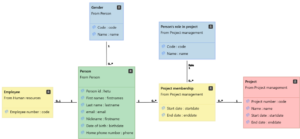
A person exists. During a project, relevant things happen. There are roles a person may have in a project, and a person has a gender. A person may be an employee, and working in a project at any time.