DSharp.fi
  • Home
  • Solutions
    • DSharp PathFinder
    • DSharp Studio
    • DSharp Studio Modeler
    • Pricing and Licenses
  • Services
    • Professional services
    • DSharp Training Program and Certifications
    • Developer Support
  • Customers
    • Our Customers
    • Customer Success Stories
      • Pirte’s Data Platform Modernization Boosts Data-Driven Healthcare
      • A City Expanded Its Data Warehouse with Library Data
      • Varha – a wellbeing services county – built a data-driven management system
      • From Double Checks to Smooth Automation – DSharp Studio Simplified Early Childhood Education Data Management
      • Productivity Leap improved Metsähallitus’ data management with DSharp Studio
  • Partners
    • Our Partners
    • Partner Stories
    • Become a Partner
  • Resources
  • Articles
    • Data warehousing
      • Data Warehouse concepts and data models
      • DSharp Studio Release: Extended Data Catalog and New Find Command
    • Reporting automation
      • Automate data pipelines
      • Making Data Management Easier with Automation
      • Metsähallitus enhanced its data management with DSharp’s data platform tool
    • Data modeling and mapping
      • Data Warehouse concepts and data models
      • Data vs Business Driven Modeling
  • About
    • About us
    • Contact us
    • Recruiting
  • Book a Demo
  • Start a Trial
  • Menu Menu
  • Features
    • DSharp Studio Features
    • DSharp Studio Modeler Features
    • Command Reference
    • Release Notes
    • Installation Guide
  • Modeling
    • Design Considerations
      • Data vs Business Driven Modeling
      • The Business Key
    • Basics
      • Model Types
      • Archetypes
      • Datatypes
    • Raw Model
      • Source Mappings
      • Metadata
    • Business Model
      • Metadata
  • Course Material
    • DSharp Studio Professional Course
    • DSharp Studio Expert Course
  • Legacy
    • DSharp Engine Features
      • Mapping Source Data in DSharp Engine
    • DSharp Engine Command Reference
    • DSharp Engine Installation Guide
    • 3rd Party Modeling Tools
      • Visual Paradigm
        • Modeling With Visual Paradigm
        • Configuring Data Vault 2.0 And Servers
        • Implementing Mappings
        • Setting Up
          • Import Stereotypes
          • Configure UI
      • Ellie
        • Modeling With Ellie
        • Ellie Metadata
    • Course Material
      • Intro Course
      • Advanced Course
  • Community
  • FAQ

What We Learn

How transaction-type data translates to a non-historized link table. Also how to perform custom or ad hoc transformations during load.

Scenario, Mapping And Modeling

Satellites capture change. If the data never changes, they are not needed, and a non-historized link is used. It is a link table containing all the properties modeled for the class. The same hash is never expected to be loaded again.

We will be expanding the model with financial data from the FinMaster source system like this:

Source table… …goes to the Staging Area as… …and maps to the Class
DS_DemoData.FinMaster.ACCOUNT FinMaster.RAW_ACCOUNT Account
DS_DemoData.FinMaster.COSTCENTER FinMaster.RAW_COSTCENTER Cost center
DS_DemoData.FinMaster.ACCOUNTINGENTRY FinMaster.ACCOUNTINGENTRY Accounting entry

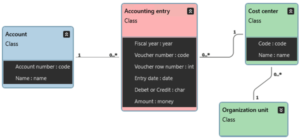
Model the new classes as below. Assume Code to be the Business key for both Cost Center and Account.

Accounting entry is the transaction. For it to be correctly implemented, it first of all needs to have a Primary key (since a Business key would result in it having a hub). By looking at the data, you feel confident that the Primary key is composited of the attributes Fiscal year, Voucher number and Voucher row number. Write these in the Identifying key field in the class metadata similarly to how you did it for Project membership in Tutorial 3. This results in a link with a satellite. To finalize the class and turn the link into a non-historized link, set the Is transaction metadata parameter to true.

From the source data you can also see that Cost Center connects to Organization unit. Draw that association to the existing Organization unit class.

Mark the classes for implementation, export the model and refresh D♯ Engine.
Take a closer look at the source data. First the accounting data:

And the Cost centers:
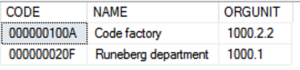
Since a hashed ACCOUNTINGENTRY.COSTCENTER value (100A) will never match a hashed COSTCENTER.CODE (000000100A), either six leading zeros will need to be added to the acconting data or removed from the cost center data. This can be done using the Transformation column in the mapping file as explained here. In this case, we will be using an existing custom transformation. Custom transformations are implemented as scripted C# classes directly in the D# Engine workspace, and they will be a subject for another tutorial. For reference, this is the custom class implementing the transformation:

class StripLeadingZerosTransformation : ColumnValueTransformation
{ 
    public override String Transform(String pSource)
    {
        return "SUBSTRING(%SOURCE%, PATINDEX('%[^0]%', %SOURCE% + '.'), LEN(%SOURCE%))".Replace("%SOURCE%", pSource);
    }
}

Map the the data into the new file 04_Mappings_FinMaster.csv. The final mapping file will look like this (note the syntax for the transformation):

Note that the reference to ORGMASTER.RAW_ORGANIZATIONUNIT.ORGUNIT_ID contains the schema name as qualifier, as the RAW_ORGMASTER tale resides in a different schema than RAW_COSTCENTER.

Save the mappings and refresh D# Engine. Verify that the Raw Vault implementation for the new classes looks like this:
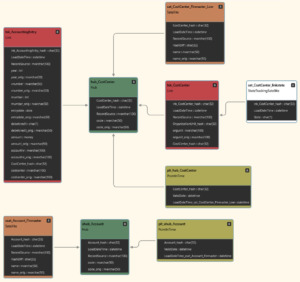
Deploy the classes, and take a look at the SQL code for [DemoDW].[etl].[Hash_FinMaster_RAW_COSTCENTER] and spot the lines of code that handle the transformation.

Run Tutorial Scripts

Run the following tutorial script commands fron the Help -> Tutorials -> Intro Course -> Transactions menu, and inspect the results.

Script Source data Main points of interest
Step 1: Load accounting data Only a link table created for Accounting entry.
Cost center also stores the original, non-transformed, value for Code (in the hub, as Code is the Business key). This happens when the original value goes through a datatype conversion or a transformation.
Step 2: Reload corrected data An error has been fixed on one row, and a new row has been added. The link table load fails. A non-historized link does not expect the same hash to appear again. This is by design.

Next tutorial

  • Developer Content
    • No Access
    • Model Types
    • Archetypes
    • Datatypes
    • Source Mappings
    • Metadata
    • Metadata
    • Data vs Business Driven Modeling
    • The Business Key
    • DSharp Studio Professional Course
      • Tutorial 01: Person Tutorial
      • Tutorial 02: Add Attributes
      • Tutorial 03: Project Tutorial
      • Tutorial 04: Hash Error Handling
      • Tutorial 05: Simple Hierarchy
      • Tutorial 06: Transactions
      • Tutorial 07: Filtering Data
      • Tutorial 08: Loading Multiple Classes From One Source
      • Tutorial 09: Handling Legitimate Duplicates
      • Tutorial 10: Multiple Attribute Values
    • Intro Course
      • Intro Course – Before You Begin
      • Tutorial 01 – Visual Paradigm
      • Tutorial 01 – Ellie
      • Tutorial 01: Person Tutorial
      • Tutorial 02: Add Attributes
      • Tutorial 03: Project Tutorial
      • Tutorial 04: Hash Error Handling
      • Tutorial 05: Simple Hierarchy
      • Tutorial 06: Transactions
      • Tutorial 07: Changing Load Behaviour
      • Tutorial 08: Loading Multiple Classes From One Source
      • Tutorial 09: Handling Legitimate Duplicates
      • Tutorial 10: Multiple Attribute Values
    • Advanced BDP Developer Course
      • Tutorial 01: Key Groups
      • Tutorial 02: Implementing the Participation Design Pattern
      • Tutorial 03: Versioned Source Data
      • Tutorial 04: Advanced State Handling
      • Tutorial 05: Hierarchy Alternatives
      • Tutorial 06: Hierarchy Depth Changes
      • Tutorial 07: Partial Load Deletion Detection
      • Tutorial 08: Merge Hashes Non-Destructively
      • Tutorial 09: Implementing Business Objects
      • Tutorial 10: Custom Value Transformations
    • DSharp Studio Expert Course
      • Tutorial 01: Key Groups
      • Tutorial 02: Implementing the Participation Design Pattern
      • Tutorial 03: Versioned Source Data
      • Tutorial 04: Advanced State Handling
      • Tutorial 05: Hierarchy Alternatives
      • Tutorial 06: Hierarchy Depth Changes
      • Tutorial 07: Partial Load Deletion Detection
      • Tutorial 08: Merge Hashes Non-Destructively
      • Tutorial 09: Derived Classes
    • Mapping Source Data
    • Command Reference
    • Release Notes And Downloads
    • DSharp Studio Command Reference
    • DSharp Studio Command Reference
    • DSharp Studio Features
    • DSharp Studio Modeler Features
    • DSharp Studio Modeler Installation Guide
    • Installation Guide
    • Configuring Data Vault 2.0 And Servers
    • Modeling With Visual Paradigm
    • Implementing Mappings
    • Import Stereotypes
    • Configure Visual Paradigm UI
    • Modeling With Ellie
    • Ellie Metadata
  • Frequently Asked Questions

Finland
Yliopistonkatu 31, 20100, Turku
Bertel Jungin aukio 5, 02600 Espoo

Germany
Podbielskistrasse 333,
5th floor, 30659, Hannover

Solutions

  • DSharp Studio
  • DSharp Studio Modeler
  • Pricing and Licenses

FAQ

  • About us
  • Contact us
  • Recruiting

Legal

  • Privacy policy
  • DSharp Studio License Subscription Agreement

Contact us!

    © Copyright DSharp Oy
    • Link to LinkedIn
    • Link to Mail
    Scroll to top Scroll to top Scroll to top