At the beginning of every BDP project, you should configure the infrastructure part of the Visual Paradigm project file. The following template content is available:
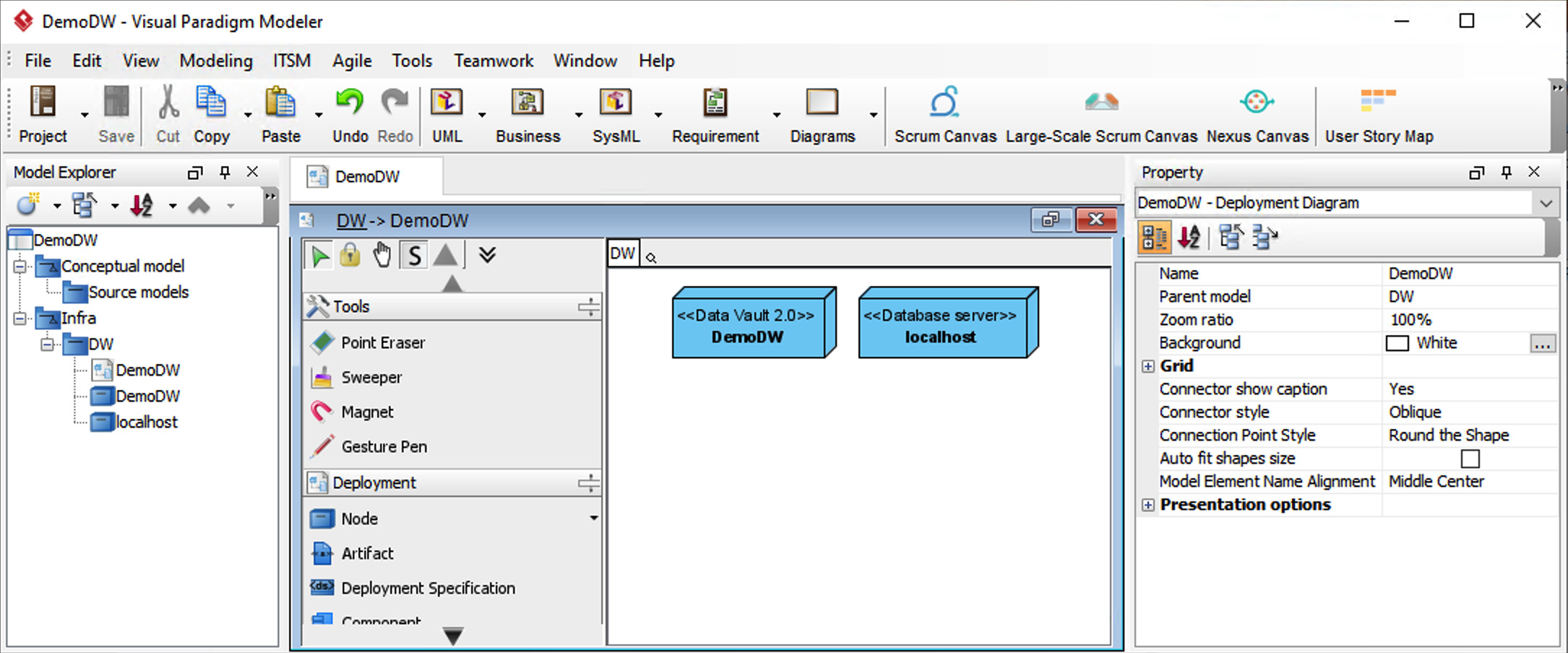
Data Vault 2.0
The Data Vault 2.0 element contains important set-and-forget parameters that covers different project wide aspects of the automation.
The following parameters are available:
| ParamEter | Description |
|---|---|
| Target platform | Selection from all supported target platforms that D♯ Engine can the solution for. Select the appropriate platform for the current project. |
| Satellite creation | By rate of change (default): satellites are created strictly by the rate of change selection for that class
Specify per class: delegates the choice to the individual class to either use the default rate of change, or a smaller resolution. Deprecated. |
| Rate of Change resolution | As modeled (default): satellites are created strictly by the rate of change selection for that class
Low – Medium – High: constricts the resolution to three levels, effectively limiting the number of satellites that are automatically created for one class. Deprecated. |
| Hash function | Select the hash function to be used. Possible values:
Selection affects the hashing function to be used as well as the column size for all hash columns. |
| Nullhash pattern | A string that is repeated until the length of the hash column is reached and that is used as the null hash value. |
| Source system target | Deprecated. |
| Default Staging area schema | Deprecated. |
| Common code schema | Schema meant for manual development. D♯ Engine does not generate anything to this location, but may expect certain objects to reside here.
Default: Server.%DWNAME%.dwDevelop |
| ETL code schema | Target schema for all D♯ Engine-generated procedures and working tables. Error schema and error handling procedures are derived from this value, adding the _errors postfix to the schema name.
Default: Server.%DWNAME%.etl |
| Log schema | Schema where the logging mechanism resides.
Default: Server.%DWNAME%.Log |
| Raw vault schema | Target schema for Raw Vault tables.
Default: Server.%DWNAME%.dwraw |
| Business vault schema | Target schema for Business Valut tables as well as the class view layer.
Default: Server.%DWNAME%.dwBV |
| InfoMart schema | Target schema for InfoMart objects, ie fact and dimension tables. Currently D♯ Engine does not generate anything into this schema.
Default: Server.%DWNAME%.dwInfo |
| Metadata schema | Schema to contain metadata. Currently D♯ Engine does not generate anything into this schema.
Default: Server.%DWNAME%.dwMeta |
| Hash field postfix | String to be added to the end of the generated hash column name.
Default: _hash |
| Stage table prefix | Currently not in use.
Default: _out |
| Hub name prefix | String to be added to the beginning of the generated table name for other than Description classes..
Default: hub_ |
| Description hub prefix | String to be added to the beginning of the generated table name for Description classes..
Default: xhub_ |
| Link name prefix | String to be added to the beginning of the generated table name.
Default: lnk_ |
| Satellite name prefix | String to be added to the beginning of the generated table name for other than Description classes.
Default: sat_ |
| Description satellite name prefix | String to be added to the beginning of the generated table name for Description classes.
Default: xsat_ |
| Activity satellite name prefix | String to be added to the beginning of the generated table name.
Default: act_ |
| Point-in-time name prefix | String to be added to the beginning of the generated table name.
Default: pit_ |
| Business vault object name prefix | String to be added to the beginning of the generated table name.
Default: bv_ |
| Fact name prefix | String to be added to the beginning of the generated view or table name.
Default: fact_ |
| Dimension name prefix | String to be added to the beginning of the generated view or table name.
Default: dim_ |
| Raw model view name prefix | String to be added to the beginning of the generated view or table name.
If this is the same as Business model view name prefix, class views for classes in the Raw Model will be created in the Raw vault schema instead of the Business vault schema, effectively making the class view of the Business Model class override the Raw Model class of the same name. Default: k_ |
| Business model view name prefix | String to be added to the beginning of the generated view or table name.
Default: k_ |
| Automatically manage indexes | Boolean. For any target platform that automatically manages indexes, set this to False and True otherwise.
Default: True |
Note the default value for the different schemas, Server.%DWNAME%.schemaname. The %DWNAME% parameter is automatically replaced with the name of the Data vault 2.0 element in the model, DemoDW in the default case (see image above).
Database Server
The following parameters are available:
| ParamEter | Description |
|---|---|
| Server type | Selection denoting the driver type (Native or ODBC) and the target platform type (Azure, SQL Server, PostgreSQL). |
| Connection string | A valid connection string that successfully opens the connection to the desired server/database.
You can use the variables %USERNAME% and %PASSWORD% as placeholders for the actual values. These can be replaced with the actual database login name and password in D♯ Engine before the connection is opened. |
| Default SQL Target | Boolean. Set value to True for the server that contains the BDP solution you are working on. This way you can browse the data by simply clicking on the class elements and other generated elements in D♯ Engine to query the target database. This also defines the connection to be used when fetching example data for the HTML documentation.
Note: if you set several servers to be Default SQL Targets, one of them will be selected randomly. If you set none, you will need to define one in D♯ Engine in order for the database connections to work when clicking on model elements. |