Tutorial 05 – Hierarchy Alternatives
What We Learn
We learn how to split hierarchical data in different ways.
Scenario
From a new source, OrgMaster Pro, we get an organization structure presented to us as a flat structure, as opposed to a self-referencing structure we loaded in Tutorial 05 of the Professional course. We load this data set into three different target structures. Using aliases, we will load the sama data to:
- a flat structure (as is)
- a hierarchy of classes, where each level in the data goes to its own class
- a self-referencing class
Our data looks like this:
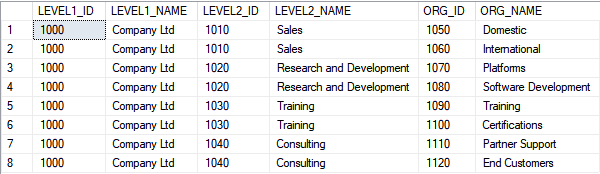
The hierarchy in general behaves like this:
- the lowest level, ORG_ID/ORG_HIER is unique
- the highest level, LEVEL1_ID/LEVEL1_NAME should be unique, but does not have to be
- all other levels may contain duplicates
Consider these 3 cases separate iterations, ie model & map & deploy them one at a time (“from left to right”) and run the appropriate test step after each iteration.
Modeling
The three target structures look like this:
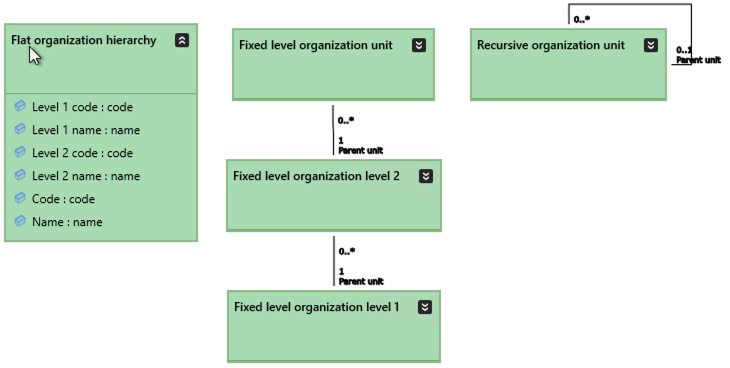
With the following details:
| do this… | …and this will happen |
|---|---|
|
In all classes, set Code to Business key |
This will work. |
|
Remember to implement this in 3 iterations |
The tutorial set advances as planned |
Mapping
The basic rule for mapping to these structures are like follows:
- Mapping to a 1:1 flat structure is trivial, no alias
- This also declares the entire source table
- In the two other cases
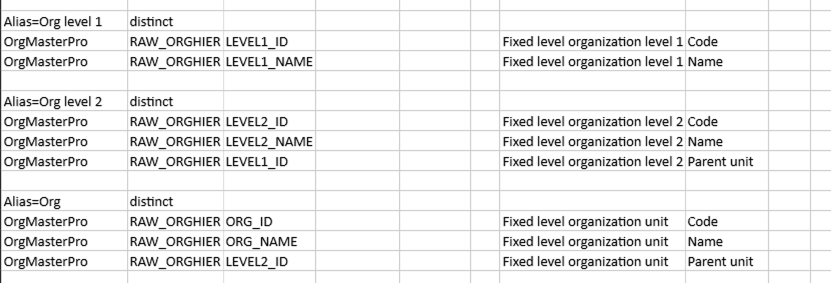
- Mapping requires an alias for each target class
- The mappings of the different levels are symmetrical, with the exception of level 1 data that does not need to map to Parent unit
- The distinct keyword is needed to skip duplicates in all but the lowest level
So the mappings will look like this, for each iteration:
Iteration 1 – Flat

Iteration 2 – Fixed Level
Iteration 3 – Recursive
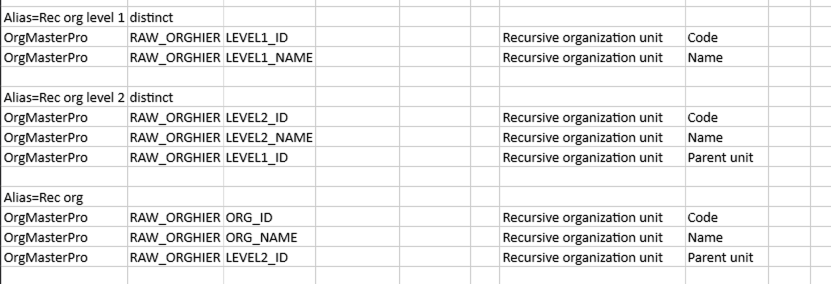
Note the symmetry within and between the fixed level and recursive structures.
Run And Inspect
Run the model and compare the target structures to note their differences.
Deploy the Changes
Deploy the new classes one iteration at a time:
- Flat organization hierarchy
- Fixed level organization level 1
- Fixed level organization level 2
- Fixed level organization unit
- Recursive organization unit
and run thew following steps:
| Script | Source data | Main points of interest |
|---|---|---|
| Step 1: Load flat organization | A flat organisation hierarchy | The 1:1 case results in a class view that in itself is a flat hierarchy.The flat structure has a single hub & satellite. |
| Step 2: Load hierarchical organization | A flat organisation hierarchy | The fixed level structure has as many hub/satellite pairs as there are levels, as well as a link table to point to the upper level. |
| Step 3: Load recursive organization | A flat organisation hierarchy | The recursive structure has one hub, a link and as many satellites as there are levels. |