What We Learn
We learn how to separate collision-prone and logically incompatible business keys by using Key Groups.
Scenario
We have previously (Into Course, Tutorial 3) loaded Projects from ProjMaster. Based on the data, we decided that Project number is a valid Business key, and we implemented accordingly. Now we find out that another business unit in our organization is using another installation of the ProjMaster system for their own purposes. It is the same version as the one we have previously loaded, but the data contained within these two are not synchronized in any way.
Study the ProjMaster as well as ProjMasterGardening schema contents in the demo data database. You will discover that
- there are overlapping project numbers,
- the same project number does not mean the same actual project,
- the sets of roles that persons can have in projects are different in the two source systems and
- Person data is the same, in that the same business key matches the same person in both sources
The conclusion is that previous Business keys assumed to be valid are valid only locally (for a specific set of users in a specific business area, using a specific instance of the software) and not globally. To remedy this, we have at least two options:
- we can add an attribute (“Source”, “Context” or similar) to Project, and include it in the Business key, or
- we can use Key Groups do define the scope of the Business key
In short, we need to separate the overlapping Business keys from each other using some appropriate context as a qualifier.
The drawback of using the first approach is that we need to recalculate all existing hashes. Also, one could argue that Source is not a real attribute of the Project class, it is just needed for technical reasons, and as such it really has no place in the Conceptual model. Also, the data to populate it does not exist in the source system, but needs to be manually hardcoded.
So we’ll go with the second option.
For a more detailed discussion about the Business key, look here.
Modeling
From the model’s point of view, nothing changes. The new system does not bring any new classes or even attributes. Only the data source, and hence the data, is different. The new revelation is that classes Project and Person’s role in project contain data for which the Business key namespaces now need to be different depending on the source, and this should be implemented as a change in class metadata.
| do this… | …and this will happen |
|---|---|
|
For Project, set Key Groups to ProjMasterGardening=ProjKG1 |
When the source (schema) is ProjMasterGardening, the string ProjKG1 is added as a component to the hash calculation, removing the collision risk for data loaded from ProjMaster, which has no additional component in its hash calculation. |
|
For Person’s role in project, set Key Groups to ProjMasterGardening = ProjKG1 |
As above. |
|
For Project membership, do nothing! |
Everything will work. Note that as the key for Project membership is defined as a composite key containing references to Project/Person’s role in project, which have the Key Group handling activated, the hash for the Project Membership will automatically contain whatever Key Groups are defined for the referenced classes. Feel free to verify this in the hashing procedure for Project membership when hashing from ProjMasterGardening! |
Mapping
When loading data from a new source, we usually create a new mapping file for the new source system. This is not strictly compulsory, and in some cases (typically multitenant solutions) we may want to use existing mapping files. In this case, where we have several instances of the same source system, we can use the same mapping file, at least until the sources start to diverge, which may or may not happen.
You may do as you please, but if you opt for reusing the existing file, you may also want to change its name to reflect its new contents.
| do this… | …and this will happen |
|---|---|
|
In the ProjMaster mapping file, for each item in the SourceSystems column where the value is ProjMaster, add the new source name so that the new content is the comma separated list “ProjMaster, ProjMasterGardening” |
The ProjMasterGardening data will have an identical mapping to ProjMaster and will be loaded from its own schema |
Your mapping file should look like this:

Refresh and Inspect
Refresh D♯ Engine with the current model export and mappings.
Note the new KeyContext column in the affected hubs:
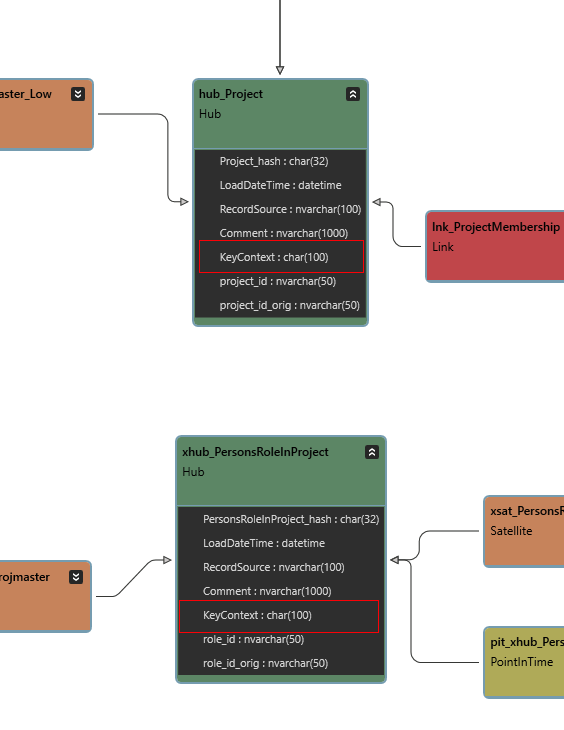
In the SQL Pane, view the hash procedure code for Project when loaded from ProjMaster and ProjMasterGardening, respectively. See how the Key Group is applied in both cases (ie not applied with ProjMaster, but applied with ProjMasterGardening).
When loaded from ProjMaster (same hash as before adding ProjMasterGardening as source):
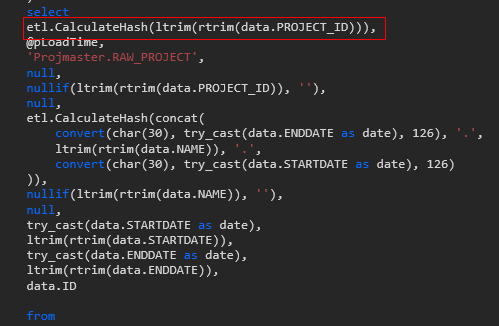
When loaded from ProjMasterGardening:

Also note that Person’s role in project behaves in a similar fashion.
Inspect the generated view code for the Project membership. Note how the reference to Person’s role in project uses all defined key groups together with the Business key to generate the correct hash to be used, depending on the source of the current Project membership data. The substring part extracts the source name from the Project membership’s RecordSource metadata column in order to pair it with the correct Key Group of the referenced row.

Deploy the Changes
Deploy all the classes that have a new source system: Person, Project, Person’s role in project and Project membership.
Run the tutorial command step.
| Script | Source data | Main points of interest |
|---|---|---|
| Step 1: Load new project data | Project data from a new source. | Projects and roles from different sources but with the same Business key get a different hash.
Project membership correctly references all its associated classes. |