Tutorial 02 – Implementing the Participation Design Pattern
What We Learn
We learn how to implement straight references in the source data using the more flexible Participation design pattern instead.
Scenario
We get a new source for Project data, ProjMaster Apprentice, which has a different structure than previously loaded Project data. The source data directly links the Person as project manager to the Project, and implemented accordingly, our model would now look like this:
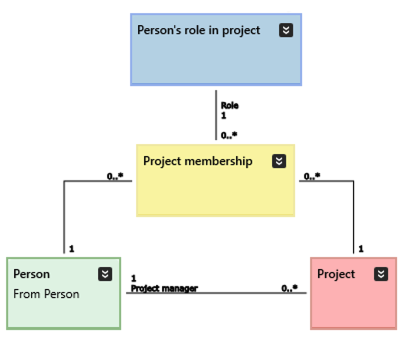
If we implement the Project manager association as above (which we won’t), these things follow:
- previously loaded data does not accommodate for the new direct reference and will need to be reloaded if this direct reference is meant to be enforced
- for future cases, we need to decide whether to load Project manager data to the association or to the Project membership class, or even both
- either way, we introduce redundancy to our model: we have two possible ways to represent someone being a project manager, and may need to query two different routes from Project to Person to list all project managers in the DW. This is bad design.
The need for reloading because the model changes may itself be a signal of a bad design.
Looking at the data, these additional points can be made:
- Person data in the new source is almost compatible with our current model and implementation, the only difference being the code value representing Gender (M, F as opposed to 1, 2, 9 that we have loaded earlier)
- there are overlapping project numbers across the different source systems and it appears that the same project number means the same actual project that can be found in the ProjMasterGardening system that we are already loading. We verify with the customer that this is in fact the case, and will always be.
Worth thinking about is the fact that the gender codes already in the DW are clearly different than the ones we are now loading as new. As there is no overlap, we don’t need to define a new Key Group for Gender to keep these separate. We could, though, and using a Key Group would be a more future proof approach. But in this case we choose not to.
Hence, the task list for us in this tutorial will be:
- Load the new person data to the existing Person class
- Load some of the new project data to the existing Project class
- Match the relevant hashes with the ones loaded from ProjMaster Gardening
- Load some of the new project data to the existing Project membership class
Modeling
We are happy with our current flexible model, and we want to keep using it. So we will not explicitly model the Project manager association. In this case nothing changes in the model itself. The only thing we need to do is add the correct Key Group to Project and Person’s role in project to make sure we get hash values that are identical with the ones calculated from ProjMaster Gardening.
| do this… | …and this will happen |
|---|---|
|
For Project, add the Key Group ProjMasterApprentice=ProjKG1 |
When the source (schema) is ProjMasterApprentice, the string ProjKG1 is added as a component to the hash calculation to produce hashes compatible with the previously implemented ProjMasterGardening data, effectively integrating the data from these two sources. |
|
For Person’s role in project, add the Key Group ProjMasterApprentice=ProjKG1 |
Even though we don’t load the Person’s role in project data itself, we need to prepare it for incoming references from Project membership data loaded from ProjMaster Apprentice. This is because the Role_hash value in the Project membership view will be calculated at run time, and the view will be using its own source info to accomplish this. |
|
For Project membership, do nothing! |
Worth mentioning that everything will work. See previous tutorial. |
Mapping
We will create a new mapping file for ProjMaster Apprentice. Mapping the person data is trivial, but we also decide to populate the Gender from the same source table as Person. We get these mapping sets:

Note the following details:
- RAW_Person is mapped as is directly onto Person
- RAW_Person is also used as source for Gender. In this case, an alias is used to separate the data flow to Person from the data flow to Gender. The alias should be unique for each source table.
- The column RAW_Person.GENDER is mapped onto two different classes: in the Person mapping it represents the association to the Gender class, and in the Gender mapping it represents the attribute.
- We also want to “cheat” by creating data that does not exist: we create Gender.Name from the RAW_PERSON.GENDER value using a transformation. We have adopted the working principle that for each generated value we create a “dummy” column to use as a virtual source to indicate that the value does not in fact originate from the actual source system.
- We are setting the distinct parameter value for the Gender load because otherwise the insert query would provide duplicate values for the gender data (one row for each person in the table)
The incoming project data will be mapped onto two different classes, which will also require the use of Aliases. If splitting one source table to several target classes, it is a good practice to start by declaring the entire source table without actually mapping anything at this time. This way the entire source table definition is conveniently in one place for easy reference, instead of being split into several chunks over the different alias definitions. Example of this approach below:
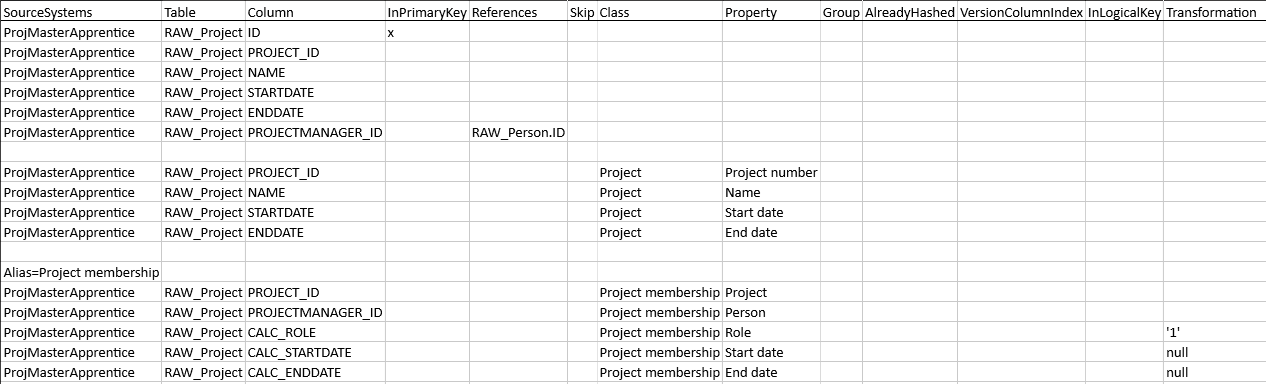
Noteworthy things:
- RAW_Project is first declared in its entirety without any mapping data
- In a separate set of rows in the spreadsheet, only the columns available in the Project class are mapped to Project
- As RAW_Project is mapped onto two different classes, an alias is used to denote the mapping set that targets the Project membership class
- In the mapping set describing Project membership, we are re-using the PROJECT_ID column to represent the association between Project membership and Project
- As the source data does not provide data for all relevant attributes in Project membership, we have defined the following dummy columns for which we have additionally defined the appropriate transformations to create the same semantic meaning in the target structure that we have in the source:
- CALC_ROLE: we use the transformation ‘1’ to force the person’s role to the source specific equivalent of project manager (“Gardenmeister” in this case)
- CALC_STARTDATE, CALC_ENDDATE: we use the null transformation to explicitly state that we don’t know when this Project membership has been active. This is also exactly the same information that the direct association from Project to Person in the source data tells us (or doesn’t).
Run And Inspect
Run the model. In the UI, check these details:
- view SQL code for the procedure Hash_ProjMasterApprentice_RAW_PROJECT to verify the use of correct Key Group when hashing Project (hash should include projkg1)
- view SQL code for the procedure Hash_ProjMasterApprentice_RAW_PROJECT_ProjectMembership to verify the use of correct Key Group when hashing Project membership (hash should include projkg1)
- verify the correct use of Key Group and data source in the Project membership view when referencing the Person’s role in project view (both projmastergardening and projmasterapprentice should connect to the projkg1 Key Group)
Deploy the Changes
We need to deploy these classes:
- the ones that are now explicitly loaded from new sources: Person, Gender, Project, Project membership
- the ones that have changed metadata, even though we don’t load them: Person’s role in project
Additionally, as a general rule, we need to deploy any class that references a blue description class that has had its list of Key Groups changed, as those classes need to get their user views updated. In this case the only class that directly references Person’s role in project is Project membership, which is already listed above.
Hint: to find out which all classes reference, say, Person’s role in project, and should be deployed, select it in the Models tree and run the Diagram.Show Referencing in New Ad Hoc Class Diagram command (Ctrl + Shift + R). The generated diagram will show the class as well as all classes that directly reference it. Click Arrange to get an unobstructed view of all referencing classes.
Deploy the classes listed above. Then run the tutorial command step.
| Script | Source data | Main points of interest |
|---|---|---|
| Step 1: Load new project data | Project data from a new source. | The project 0002 from ProjMaster Apprentice and ProjMaster Gardening has been assigned the same hash value from both sources.
The role of Project manager, or rather Gardenmeister, is correctly assigned and available for the projects loaded from the new source. Gender contains two separate value lists. |