Tutorial 07 – Partial Load Deletion Detection
What We Learn
We can automatically apply a source-aware algorithm for deletion detection to mark data as deleted.
Scenario
We want to start soft deleting Projects. In a full load situation where we possibly load the same class from several source systems, we can activate the enhanced deletion detection mechanism by only setting the corresponding parameter to true for the class for which we want to activate the algorithm.
In short, if State tracking has been turned on:
- Algorithm off: “Don’t mark any class’ hashes as deleted if any source system for that class has zero rows to load in this batch. If all sources have some data to be loaded, mark all hashes as deleted that are missing from all of the source material”
- Algorithm on: “Mark those hashes as deleted that don’t exist in any source that the hash has been loaded from before, but not those that only come from sources that have zero rows to load in this batch”
Modeling
Soft delete requires the State tracking to be turned on for the class we want to apply Soft delete to. We’ll just do this:
| do this… | …and this will happen |
|---|---|
|
For the Project class, check the Track state parameter value. |
The loading mechanism will start tracking how previously loaded hashes disappear and reappear in the source data. |
Run the Model And Deploy the Changes
Deploy the Project class, then run the test scripts.
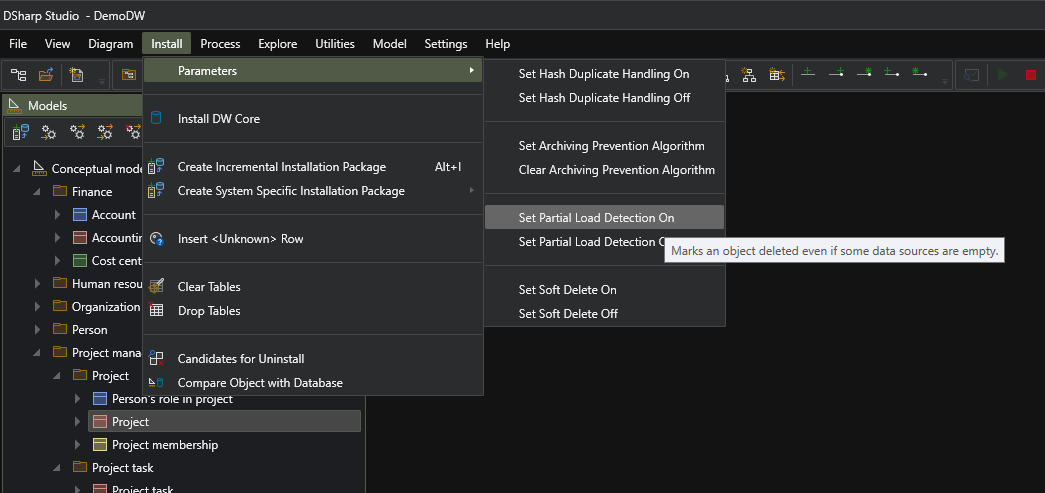
The deletion detection parameter is set like this, when required:
| Script | Source data | Main points of interest |
|---|---|---|
|
Step 1: Load all sources
|
Projects from all three sources | 6 projects in total being loaded. |
|
Step 2: Omit one source system from load
|
One source not loaded | Initially, unchanged content due to delete detection not turned on. After turning on the detection, the new load of the same material correctly soft deleted an item that was never loaded from the missing source. |
|
Step 3: Only load one source
|
Loaded only from one source | Successful soft delete of item that was missing from the one loaded source. The item had not been loaded from any other source previously. |
|
Step 4: Load several changes
|
Load changed, added and deleted data from all sources | Project missing from one source that is the only source it has been loaded from is successfully soft deleted. |