Here you will find out how to deal with certain situations that may occur during development or even in production. If you have a question you feel should be included here, please submit it to devsupport(at)dsharp.fi.
Error: Tagged value ‘Mapping file content’ already exists in $Element$
This is probably because of identical rows in a mapping file. Locate the row from your mapping file(s) containing $Element$ and check whether there is an identical row somewhere else. This could be due to a copy-paste edit that wasn’t finalized.
The name of the mapping file that caused this error can be found further up in the log.
Error: Command Create Installation Package execution failed in ColumnTransformationGenerator.DefaultGenerateOriginalDataColumn with message ‘Column work_XXX.$COLUMN$ has no incoming flow.’
This is most likely a mapping problem. Either
- you have no mappings to the property representing $COLUMN$, or
- you have more than one mapping from the same source to $COLUMN$, making the mappings ambiguous.
Either way, check your mappings.
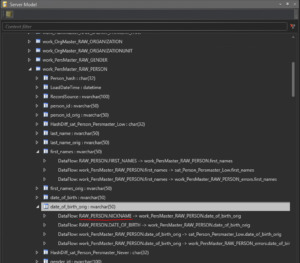
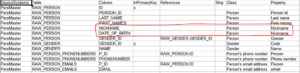
You can also use the Server Model pane to check the outgoing as well as incoming data flows for any column to locate the offending mapping.
Error: ProjectOpener.OpenProject - Could not register Id $ID$ as it already exists.
This may occasionally happen due to a Visual Paradigm bug where VP creates identical internal ID:s for more than one element (say, two attributes or two classes). To fix this problem
- open the VP export file (project.xml) in a text editor
- locate the id value in the XML code (an XML tag that looks like id = “$ID$”)
- check what elements the ID represents
- check the name XML tag for the identified XML element to find out how it “looks like” in VP
- check the parent XML element name to identify the parent of the offending element. For example, an attribute with a duplicate id is contained within a collection, which in turn is a child element of a Class element. So you should look for that class and that attribute in VP to correct the problem.
- locate those elements in your Visual Paradigm model
- delete all but one of the elements with the same id and recreate them exactly as they were
- try a new export
The new export file should contain the same content as the previous failed export, but with unique internal ids.
Error: The following duplicate attribute- or association end names found in class $ClassName$: $AttributeName$.
The class probably has either
- an association end that has the same name as an attribute, or
- two or more identical associations to the same class
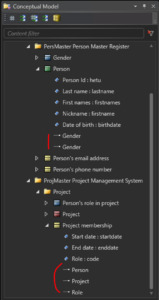
Some associations may not be visible in the modeling tool’s diagrams, so to spot duplicate associations, you may need to open a dialog that lists all the associations of the class $ClassName$. If you find one, remove either of the duplicates, or give a descriptive role name to the other association end, if that appears to be the solution.
In SmartEngine the situation may look like this:
How do I draw a self-reference association in Visual Paradigm?
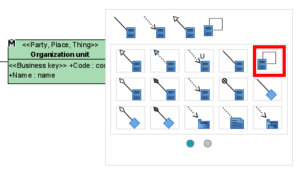
Visual Paradigm has a specific tool for self-references: instead of the button with a straight-line association to another class, use the angled line button that connects the class to itself:
.
How should I handle denormalized source data?
Denormalized data can optionally, depending on your high level DW-architectural design decisions, be split into/mapped to several classes, combining groups of columns together that belong to the same class. The necessary information to implement the associations between the different classes should also be present.
In addition to the non-redundant data columns, the “wide” data row may, for instance, contain one or several code/name pairs (with possible additional related details), and it is worth noting that these are most likely consistent within that one snapshot, but combining several snapshots (if, say, reloading an entire year’s worth of one-day snapshots) may lead to inconsistencies. For example, the same account number may have had a different name on a different day, and combining those two snapshots into the same material leads to a distinct query that returns two records for the same code, which may affect the way the data is loaded.
How should I handle versioned source data?
Example: List of Persons, containing different versions of the same Person, with validstartdate/validenddate columns indicating when a particular record has been valid. The problem is that for the individual record to be unique, in addition to the “natural” key component, the key also needs to contain the version indicator. This makes for an unusable Business key.
There are several ways to go about loading this data. Here are a couple of examples:
1. Completely ignore the old versions
If you can afford not to load the old versions of the data, just load the newest version of each entity every time. Model Person as you normally would, leave out version indicators, and make the Person Id the Business Key.
2. First load old versions, then newest version
If you need the non-current data to be stored in the DW, you may load it separately in same-version batches when you load the Person data for the first time. Let the Data Vault mechanism take care of handling the changes. After the initial load, switch to loading just the newest version of each Person. Model as above.
3. Model history separately
To get the best of both worlds, you can model Person and Person history as two separate classes. Always load only the latest version into Person, and always load every version into Person history. The Person history class should include the version indicator in its Business Key, but Person should not.

I am starting a new project. Is there a template VP project I can use?
I get an Error in transformation -comment in my view, but my transformation looks ok
Occasionally you may get a line in the view definition that looks like
,null as ColumnName — Error in transformation transformation
but the mapping definition is correct in the corresponding Mapping dependency. In this case, there is probably a spelling error in the following mapping definition.
There is no delimiter between the individual mapping rows in a Mapping dependency, so if a row (of format Property = a mapping) defines an invalid mapping, that row is assumed to be a continuation of the previous row. Hence, the previous row, although in itself correct, will display the error message.
I get an SQL error when deploying, saying a column does not exist, but it does. What gives?
If the error message is related to creating a hash procedure, i.e. for example
Msg 207, Level 16, State 1, Procedure Hash_PersMaster_RAW_PERSON_EMAILS, Line 103 [Batch Start Line 17501]
Invalid column name ‘ID’.
then you may have mapped that column to a class but left the Property column empty. So check the mapping file for the column mentioned in the error message and verify that the mapping is complete.
Another possibility is that the column is missing from the referenced source and the source is a view. D♯ Engine does not automatically add columns to a view in the Staging Area, so you will have to do that manually before running the Deployment package. If you don’t, the hash procedure will try to reference a column that is not there, even though the mappings say it is, and hence produce the error message.
I have deployed a new association. How does the new reference column get populated for existing rows?
The existing hashes will remain in the link table. A link state table may or may not “retire” these non-current link rows, so to be on the safe side, it is recommended to completely reload the link table rather than to wait for it to catch up.
I have deployed a new attribute. How does the new column get populated for existing rows?
A deployed attribute will end up in a satellite (for the most part). If it does, the hashdiff calculation formula will be updated to include the new attribute. Hence every row in that satellite is invalidated, as the hashdiff will be different for every row that will subsequently be hashed for that satellite, whether the identifying hash already exists in that satellite or not. Meaning the new column will be fully populated for existing rows once every existing row has been reloaded. So either wait for it to happen naturally, or explicitly reload the entire content, depending on your setup.
I have references to data that I don’t have access to right now, but may have later. How should I model it?
In case you have data that seems to reference some other data which you don’t have, you can model the missing referenced data as a class that only contains its Business Key. This way, it will get a hub (called a stub hub) and the references will be correctly hashed.
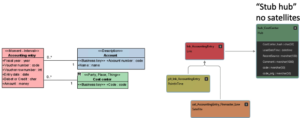
Once you get the missing reference data, you can complete the class with the missing attributes.
I have upgraded D♯ Engine. Do I need a new license file?
Software upgrades that require license upgrades as well
- Upgrading to 3.x from any 2.x version
- Upgrading to 2.4.1 up to 2.7.x from 2.4.0 or earlier
I need to change the key type from Business key to Primary key (or vice versa). What should I pay attention to?
- a hub may appear/disappear
- a link table may appear/disappear
- satellites will connect to different tables than before
Some helpful SmartEngine commands:
- Fix Hashes
- De-installation Candidates
- Compare model with DB
What should I do if a Business key value changes in the data?
From the point of view of the loading mechanism, these are just two different persons. This is because a “change” always happens with respect to a specific key, so when the key itself changes it is not a change. This is technically not an error, and as such it may be hard to catch.
Once it has been established which Person Id should represent the person going forward, any of these two approaches may be taken:
- Manually update all hash references from the old hash to new one. Update relevant PIT tables, and watch for duplicates where both hashes have been valid simultaneously.
- Use the Data Vault construct Same-as-link to map the old hash to new master hash. Then implement the mapping logic into all views that handle Person references so that the old hash is replaced with the new one. This is automatically accomplished using the Key consolidation meta-parameter for the class in question.
Useful SmartEngine command: Fix Hashes
For Business Key considerations, see The Business Key
What should I do if the structure of the Business Key changes?
This is the only change needed on model level. Deploying the change invalidates every hash in the Person hub; every Person needs to be reloaded, as the issuer data in the hub is null at this point. Care should be taken that the original hashes are stored temporarily, as after reloading the persons with their new hashes, all other tables referencing the Person hub need to be updated as well (update old person hash to new). There may also be other structural changes in referencing link tables, so this kind of change should be dealt with carefully.
Useful SmartEngine command: Fix Hashes
For Business Key considerations, see The Business Key
Why are associations to Description classes implemented as attribute data in satellites instead of reference hashes in a link table?
Description classes are designed to be compatible with lookup tables as defined in the Data Vault 2.0 specifications, so the reference is “soft” using the code as reference instead of the hashed version of the code.
Lookup tables are copied to the Data Vault as-is, and by nature they contain the referenced code and associated data in either historized or non-historized rows. Specifically, they don’t contain hashed columns. The implementation of the Description class is, however, a standard hub/satellite/link implementation, and will as such also store the changes in the lookup data, even if the source data itself is not versioned. But it is referenced identically to how a lookup table would be.
Why are there duplicate hashes in my work/error table when my raw data clearly has unique key components?
If the source for the work table contains only unique key values, the problem is most likely found in the hash procedure. There you will find joins to other work tables, and these joins will probably return multiple rows when you expect them to return exactly one. So check the source data for the referenced work tables to identify the problematic rows.
Why are there multiple ‘---...---’ -rows in my mapped Business Object view?
For each implemented Business Object, a Data Vault table structure is created and initialized with the Ghost Row. The corresponding view will contain any content present in the generated tables, as well as any content provided to it using mappings. So in this case

the view contains three different data sets, one from the underlying Business Vault tables, and one from each mapping. Each of these data sets may contain the Ghost Row. As a union all operation is used in the implementation, they will all be present in the view. Currently, you need to make sure the data sets only contain one Ghost Row by allowing it only from one source.
Why is my link not updated even though the source data changes?
There are two cases in a model that are implemented as link tables:
- Class-as-link: Class has no Business Key: the link table represents the class itself as well as connects to hubs
- Class link: Class has a Business Key and associations to non-Description classes: the link table only connects hubs
If this does not apply to your case, you should check the output of the hashing procedure.