By mapping classes to each other, you define a data flow between those classes. Any two classes can participate in a mapping, but typically a class from the Raw Model is mapped as a source to a class in the Business Model, moving the data towards the Info Mart, preparing it for reporting.
In Visual Paradigm, the class-to-class mapping is implemented with a UML Dependency that is stereotyped with the appropriate stereotype that represents the operation to be performed on the data when implementing the data flow. There are different mapping stereotypes that perform different functions, and this is a fruitful area for development: any common data operation that is needed often enough and cumbersome to implement manually is a potential new mapping.
Currently, these mapping stereotypes are available:
- Mapping: a straight-forward selection of source attributes with configurable details. Generates SQL code.
- SQL: any SQL select statement. To be used when Mapping is not sufficient.
The generated SQL code of Mapping is based on attribute-to-attribute mappings, which are either explicit or implicit. The explicit mappings are defined in the mapping’s Tagged Value, and the implicit mappings are based on these rules:
- if the source attribute has the same name as the target attribute, they are mapped automatically
- if the datatype of the source attribute is the same as the datatype of the target attribute, and it is the only attribute with that datatype in the source class, the attributes are mapped automatically
These attribute level mappings are generated for both mapping types, and they contribute to the Data Lineage information in the HTML documentation, so even if you are using a SQL mapping, please complete the attribute level mappings for documentation purposes.
Mappings Details
Mapping
The Mapping mapping type is a simple and versatile way to move data between classes. The table below describes its parameters and their use.
| Parameter | Values |
|---|---|
| Mappings | Syntax:
Target property = Source Defines the content of Target property (attribute or association end of the target class). Source can be:
The constant is inserted into the SQL statement as-is, and it can be anything that can be inserted into a select statement’s select part before as columnname, including but not limited to:
|
| Rules | The content in this parameter is generated as a where-clause in the resulting SQL statement.
Special keywords and syntax:
|
| Distinct | True or False. If True, returns distinct rows. |
Using Paths
A Path is a dot-notation description of transitions between classes using the defined associations. The first element in the path is a step along an association, and it ends either at a class or an attribute of a class. When the path is applied to a source class during implementation it results in a series of inner joins between the class views.
Consider the following model:
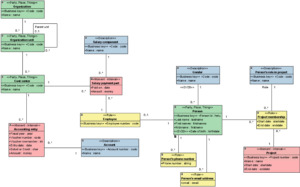
In a mapping, a path would be used to traverse the model in order to fetch a specific attribute value from another class than the source class of the mapping. In this case, paths should always be traversed towards a singular cardinality ensuring the uniqueness of the referenced attribute value.
Examples of such paths:
- Gender.Name (applied to Person)
- Employee.Person (applied to Salary payment part)
- Cost center.Organization unit.Organization (applied to either Accounting entry or Salary payment part)
Otherwise valid paths, but not applicable in mappings:
- Gender.Person (Applied to Person: Persons with the same gender)
- Project membership.Project (Applied to Person: All the projects where the person has been a member)
Mapping examples
Refining a Class
We want a Business Object that is better suited for a specific reporting need. Instead of Persons in general, we are interested in Children, who are a subset of Person.
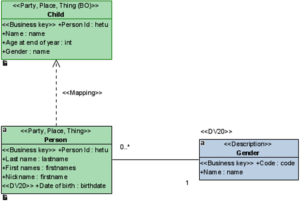
Here we define four attributes:
- Person Id has the same name and type as in the source class, so it will be implicitly mapped.
- Name does not exist in the source, but we define a constant for it that is inserted into the SQL code. That constant is in itself SQL code that combines Last name and First names into one string value.
- Age at end of year: Person provides Date of birth, from which the age can be calculated. So we define the age calculation as the source for this attribute.
- Gender: we want to have the name of the gender as an attribute value, so we fetch it from another class using dot-notation.
These are implemented as Mappings as follows (note the omission of the implicit Person Id mapping):
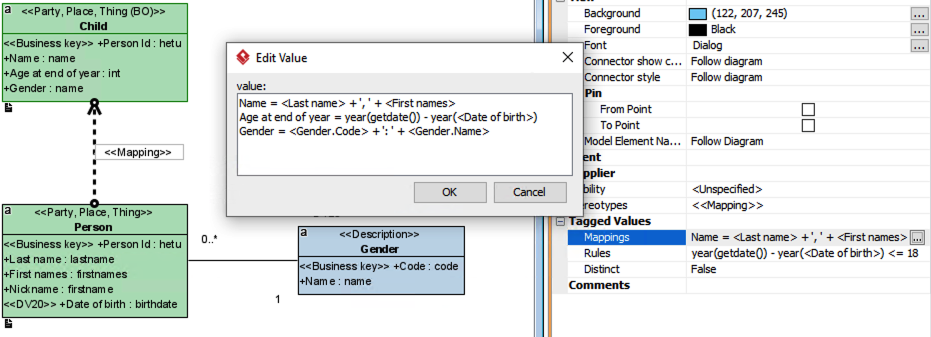
And we only want the Persons who will be 18 or less this year, so we write that rule to the Rules parameter of the mapping.
No actual mappings between source and target attributes will be created when the source is a constant, as it is not broken down and analyzed for attribute references.
The following SQL with implement this mapping:
select
etl.CalculateHash(coalesce(ltrim(rtrim(root.PersonId)), ”)) as Child_hash
,root.PersonId as PersonId
,LastName + ‘ ‘ + FirstNames as Name
,year(getdate()) – year(DateOfBirth) as Age
,step1.Name as Gender
from
dwBV.k_Person as root
inner join dwBV.k_Gender as step1
on root.Gender_hash = step1.Gender_hash
where year(getdate()) – year(DateOfBirth) <= 18
Denormalizing a Class For Simplicity
We want to simplify a complex structure so that it is easier to use. A typical case is that of the Participation pattern (see Tutorial 03 of the Intro course for the project structure), where a many-to-many relationship is modeled as a role class which connects a participating class to its context as well as to a description of the participation. Using this entire data set requires three joins between the class views, so denormalizing it into one class makes it much simpler to use.
The new class with the appropriate mappings looks like this:
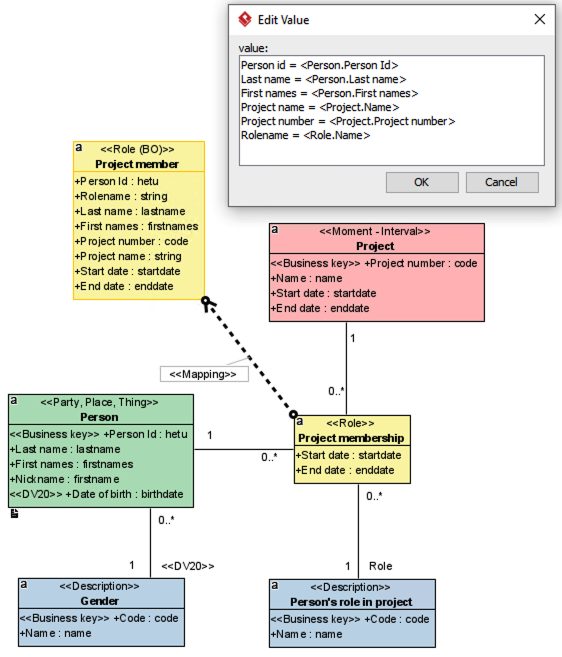
Those path definitions contribute to the class view with the following SQL:
select
DemoDW.etl.CalculateHash(
coalesce(step1.PersonId, ”) + ‘.’ +
coalesce(step3.ProjectNumber, ”) + ‘.’ +
coalesce(step2.Name, ”) + ‘.’ +
coalesce(ltrim(rtrim(root.StartDate)), ”)
) as ProjectMember_hash
,step1.PersonId as PersonId
,step2.Name as Rolename
,step1.LastName as LastName
,step1.FirstNames as FirstNames
,step3.ProjectNumber as ProjectNumber
,step3.Name as ProjectName
,root.StartDate as StartDate
,root.EndDate as EndDate
from
dwBV.k_ProjectMembership as root
inner join dwRaw.k_Person as step1
on root.Person_hash = step1.Person_hash
inner join dwBV.k_PersonsRoleInProject as step2
on root.Role_hash = step2.PersonsRoleInProject_hash
inner join dwBV.k_Project as step3
on root.Project_hash = step3.Project_hash
inner join dwBV.k_Gender as step4
on step1.Gender_hash = step4.Gender_hash
where step4.Code = ‘1’
SQL
A SQL mapping contains the exact SQL code to populate the target object. The SQL code may be any select clause. Note that CTEs may not be used, as every mapping is combined using a union operation.
Pay attention to selecting the columns in the same order that the attributes are listed in the class. The order of the association based columns (the hash references) is not obvious from the model, but you can check the correct order from the first query part that selects from the Business Vault structure.
| Parameter | Values |
|---|---|
| Mappings | Syntax:
Target property = Source See Mapping above. As this information does not contribute to the SQL, it only makes sense to register source – target attribute pairs here. Doing this helps keep the Data Lineage information up to date. |
| SQL | The SQL code that the mapping produces.
In order to write platform-independent code, you may use the following keywords and syntax instead of actual database object names:
|
Examples
Using pure SQL
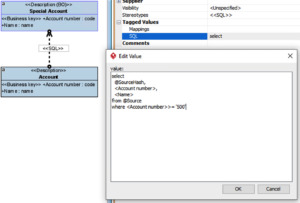
The following SQL mapping
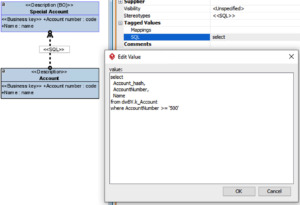
produces the following SQL:
select
Account_hash,
AccountNumber,
Name
from dwBV.k_Account
where AccountNumber >= ‘500’
Using keywords
The exact same SQL is generated when using keywords. Using keywords instead of static code makes the SQL code more resistant to mistakes, and it is platform independent as well.