DSharp.fi
  • Home
  • Solutions
    • DSharp PathFinder
    • DSharp Studio
    • DSharp Studio Modeler
    • Pricing and Licenses
  • Services
    • Professional services
    • DSharp Training Program and Certifications
    • Developer Support
  • Customers
    • Our Customers
    • Customer Success Stories
      • Pirte’s Data Platform Modernization Boosts Data-Driven Healthcare
      • A City Expanded Its Data Warehouse with Library Data
      • Varha – a wellbeing services county – built a data-driven management system
      • From Double Checks to Smooth Automation – DSharp Studio Simplified Early Childhood Education Data Management
      • Productivity Leap improved Metsähallitus’ data management with DSharp Studio
  • Partners
    • Our Partners
    • Partner Stories
    • Become a Partner
  • Resources
  • Articles
    • Data warehousing
      • Data Warehouse concepts and data models
      • DSharp Studio Release: Extended Data Catalog and New Find Command
    • Reporting automation
      • Automate data pipelines
      • Making Data Management Easier with Automation
      • Metsähallitus enhanced its data management with DSharp’s data platform tool
    • Data modeling and mapping
      • Data Warehouse concepts and data models
      • Data vs Business Driven Modeling
  • About
    • About us
    • Contact us
    • Recruiting
  • Book a Demo
  • Start a Trial
  • Menu Menu
  • Features
    • DSharp Studio Features
    • DSharp Studio Modeler Features
    • Command Reference
    • Release Notes
    • Installation Guide
  • Modeling
    • Design Considerations
      • Data vs Business Driven Modeling
      • The Business Key
    • Basics
      • Model Types
      • Archetypes
      • Datatypes
    • Raw Model
      • Source Mappings
      • Metadata
    • Business Model
      • Metadata
  • Course Material
    • DSharp Studio Professional Course
    • DSharp Studio Expert Course
  • Legacy
    • DSharp Engine Features
      • Mapping Source Data in DSharp Engine
    • DSharp Engine Command Reference
    • DSharp Engine Installation Guide
    • 3rd Party Modeling Tools
      • Visual Paradigm
        • Modeling With Visual Paradigm
        • Configuring Data Vault 2.0 And Servers
        • Implementing Mappings
        • Setting Up
          • Import Stereotypes
          • Configure UI
      • Ellie
        • Modeling With Ellie
        • Ellie Metadata
    • Course Material
      • Intro Course
      • Advanced Course
  • Community
  • FAQ

Getting Visual Paradigm Ready for D♯ Engine

In order to be able to define the metadata that the automation process requires, you first need to install the UML Stereotypes that enable the metadata parameters.

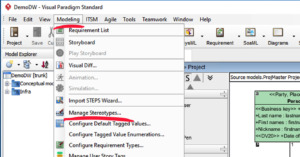
Locate the Modeling -> Manage Stereotypes… menu item and click it.
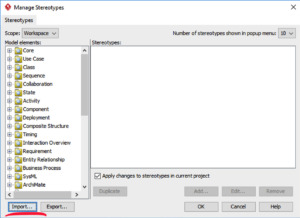
In the dialog that opens, click the Import… button.
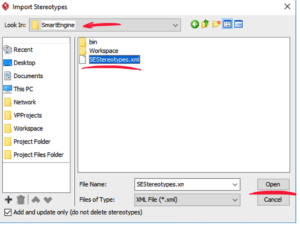
Navigate to the SEStereotypes.xml file included in your D♯ Engine installation root folder.
Open then file, and verify that its contents have been installed into VP by navigating to the Class -> Class structure, and by clicking the Class element. You should now see the complete list of Stereotypes defined for Class.
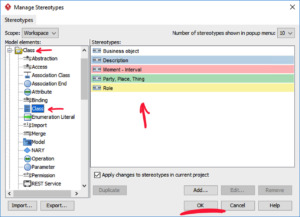
After clicking OK the Stereotypes can be assigned to the elements.

Watch the video below.

Re-importing Stereotypes

For some D♯ Engine releases, the metadata for the classes may change. In this case you should re-import the Stereotypes into Visual Paradigm. To do that, follow the steps above. However, when importing the stereotype file, you may get a dialog informing you that there are conflicts. This means that existing stereotype definitions differ from the ones that you are importing, which makes sense, as they have changed. In this case you should select the Overwrite option (not the default Unchanged option).

At this point, any new classes you assign the changed stereotypes to will include the new or changed metadata definitions, but existing classes may not. To update the metadata of existing classes, you may need to perform a couple of extra steps:

  • Restart Visual Paradigm directly after successful import of the stereotype file
    • There is a bug that sometimes duplicates the Tagged Values in all elements of the affected Stereotypes. Cleaning these up is hard and unnecessary work. So during this process, restart VP rather more often than not.
  • Open a model and inspect the metadata for existing elements (classes, for example) that that are mentioned in the release Notes, and look for any new or changed metadata items. If they are present, you’re good to go. If not, you need to execute the following steps.
    • Open the Manage Stereotypes dialog
    • For each changed stereotype definition, open it by double-clicking it, and then close it by clicking the OK button. This refreshes the definition for the selected element type.
    • Once all stereotype definitions have been refreshed like this, press OK in the Manage Stereotypes dialog. You will get the message “This will cause lots of diagram/model elements to be loaded and may take a long time, are you sure?“. Answer Yes to this, since this is where the changes are applied.
  • Restart Visual Paradigm before working on any model.

And as pictures:
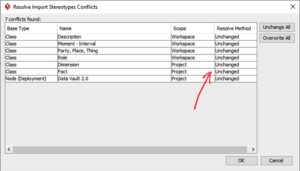
The default conflict resolving method for affected element types.
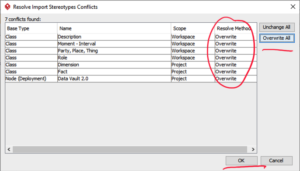
Change to Overwrite by clicking the Overwrite All button.
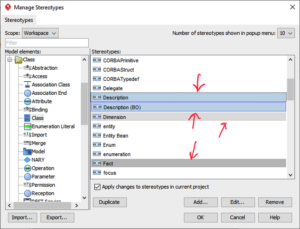
Double-click the possibly affected stereotypes.
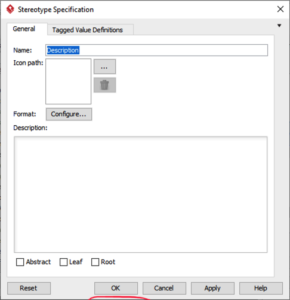
Just close the dialog,
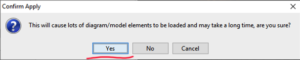
Yes, absolutely. This updates the elements’ metadata.

  • Developer Content
    • No Access
    • Model Types
    • Archetypes
    • Datatypes
    • Source Mappings
    • Metadata
    • Metadata
    • Data vs Business Driven Modeling
    • The Business Key
    • DSharp Studio Professional Course
      • Tutorial 01: Person Tutorial
      • Tutorial 02: Add Attributes
      • Tutorial 03: Project Tutorial
      • Tutorial 04: Hash Error Handling
      • Tutorial 05: Simple Hierarchy
      • Tutorial 06: Transactions
      • Tutorial 07: Filtering Data
      • Tutorial 08: Loading Multiple Classes From One Source
      • Tutorial 09: Handling Legitimate Duplicates
      • Tutorial 10: Multiple Attribute Values
    • Intro Course
      • Intro Course – Before You Begin
      • Tutorial 01 – Visual Paradigm
      • Tutorial 01 – Ellie
      • Tutorial 01: Person Tutorial
      • Tutorial 02: Add Attributes
      • Tutorial 03: Project Tutorial
      • Tutorial 04: Hash Error Handling
      • Tutorial 05: Simple Hierarchy
      • Tutorial 06: Transactions
      • Tutorial 07: Changing Load Behaviour
      • Tutorial 08: Loading Multiple Classes From One Source
      • Tutorial 09: Handling Legitimate Duplicates
      • Tutorial 10: Multiple Attribute Values
    • Advanced BDP Developer Course
      • Tutorial 01: Key Groups
      • Tutorial 02: Implementing the Participation Design Pattern
      • Tutorial 03: Versioned Source Data
      • Tutorial 04: Advanced State Handling
      • Tutorial 05: Hierarchy Alternatives
      • Tutorial 06: Hierarchy Depth Changes
      • Tutorial 07: Partial Load Deletion Detection
      • Tutorial 08: Merge Hashes Non-Destructively
      • Tutorial 09: Implementing Business Objects
      • Tutorial 10: Custom Value Transformations
    • DSharp Studio Expert Course
      • Tutorial 01: Key Groups
      • Tutorial 02: Implementing the Participation Design Pattern
      • Tutorial 03: Versioned Source Data
      • Tutorial 04: Advanced State Handling
      • Tutorial 05: Hierarchy Alternatives
      • Tutorial 06: Hierarchy Depth Changes
      • Tutorial 07: Partial Load Deletion Detection
      • Tutorial 08: Merge Hashes Non-Destructively
      • Tutorial 09: Derived Classes
    • Mapping Source Data
    • Command Reference
    • Release Notes And Downloads
    • DSharp Studio Command Reference
    • DSharp Studio Command Reference
    • DSharp Studio Features
    • DSharp Studio Modeler Features
    • DSharp Studio Modeler Installation Guide
    • Installation Guide
    • Configuring Data Vault 2.0 And Servers
    • Modeling With Visual Paradigm
    • Implementing Mappings
    • Import Stereotypes
    • Configure Visual Paradigm UI
    • Modeling With Ellie
    • Ellie Metadata
  • Frequently Asked Questions

Finland
Yliopistonkatu 31, 20100, Turku
Bertel Jungin aukio 5, 02600 Espoo

Germany
Podbielskistrasse 333,
5th floor, 30659, Hannover

Solutions

  • DSharp Studio
  • DSharp Studio Modeler
  • Pricing and Licenses

FAQ

  • About us
  • Contact us
  • Recruiting

Legal

  • Privacy policy
  • DSharp Studio License Subscription Agreement

Contact us!

    © Copyright DSharp Oy
    • Link to LinkedIn
    • Link to Mail
    Scroll to top Scroll to top Scroll to top