Tutorial 02 – Add Attributes
What We Learn
Deploying new content to an existing installation.
Scenario, Mapping And Modeling
A person’s email address as well as home phone number have suddenly become available in the PersMaster source system, and we want to add them to the DW. Changes will then need to happen in:
- the staging area table PersMaster.RAW_PERSON: the new columns (EMAIL, HOMEPHONE) must be made available to the hashing mechanism
- the Raw Model: the Person class must be extended with the new attributes
- the 01_Mappings_PersMaster.csv mapping file: the new columns need to be mapped to the new attributes
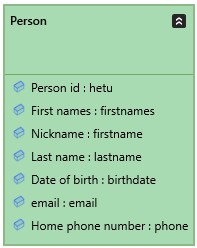
Start by adding the new attributes email : email and Home phone number : phone to the Person class. Your edited Person class should now look like this:
Open the PersMaster mapping file and drag the new columns and attributes into it so that they are correctly aligned. Then…
| …do this… | …and this will happen |
|---|---|
| Set the Group property value for Home phone number to Phones. | Home phone number will be stored in a new satellite. |
Save the project and run the model to generate the solution.
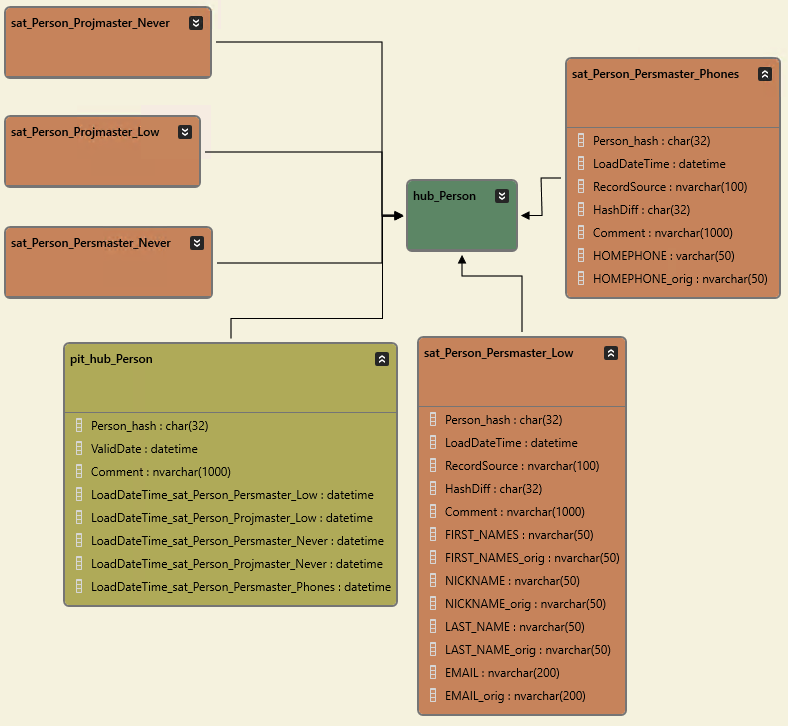
Verify that these changes have also been applied to the Raw Vault structure by selecting the Person class in the Models pane and then clicking the Open Implementation in ER Diagram button. The two satellites as well as the PIT table have been affected by the change.
Deploy the Changes
In the Models pane, make sure that Conceptual model is selected to be converted. Run the model, select the Person class, click Create Incremental Installation Package and a Deployment package hierarchy will open, where you can preview the installation structure. The deployment package will perform an incremental installation of the selecton you made: nothing in the DW will be dropped, but new objects will be added and existing altered. In this case, the Raw Vault tables will be created or altered to look like in the image above, and other relevant changes in other objects (procedures, views) will also be made.
Press the Deploy button in the Deployment package hierarchy pane to generate the SQL code for the deployment, and finally run it in SQL Server.
Run the tutorial command step.
| Script | Source data | Main points of interest |
|---|---|---|
| Step 1: Load into new structure | The Staging Area can now receive email and phone number data. | The new columns have been added to the K_Person view, and hence also to the entire Raw Vault structure. |