Tutorial 09 – Handling Legitimate Duplicates
What We Learn
How to handle data sets that contain legitimate duplicates.
Mapping
Let’s continue with the HumMaster expansion. Let’s take a look at DS_DemoData.HumMaster.SALARY_PAYMENT_PART and let’s also end up with this model:
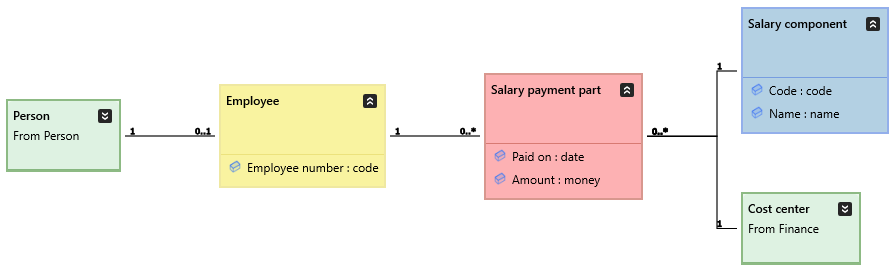

Every time an actual payment is sent out to the employee, these rows get recorded. Payments made with the same date to the same employee represent one payment/transaction. What’s noteworthy is that there are two identical rows, and they are both valid (two bonuses the same size), so it is not possible to define a natural key for this data. Hence, the Salary payment part class simply has no key. To deal with this, we will set its key type to NoKey. This forces a running index number within otherwise identical rows to be added to the hash calculation, making the hash unique even for those identical rows.
The data is also transactional in nature, as the same payment never happens more than once.
Mapping And Modeling
Model the remaining two classes like in the image above (re-use the Cost center class). Set Implement to True for new classes. Additional model details:
| Do this… | …and this happens |
|---|---|
| Set Salary component.Code as Business key. | Same old, same old… |
| Set Salary payment part to be a Transaction. | Salary payment part will be implemented by a non-historized link. |
| Set Salary payment part’s key type to NoKey and arrange all hash components into an order of your liking. Or just go with the default order. | While hashing, all identical rows will get a running index which will be included in the hash. Hence all hashes will be unique. |
Having already implemented Employer, the rest of the mappings could go like this:
| Source table… | …goes to the Staging Area as… | …and maps to the Class |
|---|---|---|
| DS_DemoData.HumMaster.SALARY_PAYMENT_PART | HumMaster.RAW_SALARY_PAYMENT_PART | Salary payment part |
| DS_DemoData.HumMaster.SALARY_COMPONENT | HumMaster.RAW_SALARY_COMPONENT | Salary component |
Add the necessary mapping rows to the 05_Mappings_HumMaster.csv file and save it.
Save the project and run the model. Open the Human Resources submodel and check its implementation. Your Raw Vault should look like this:
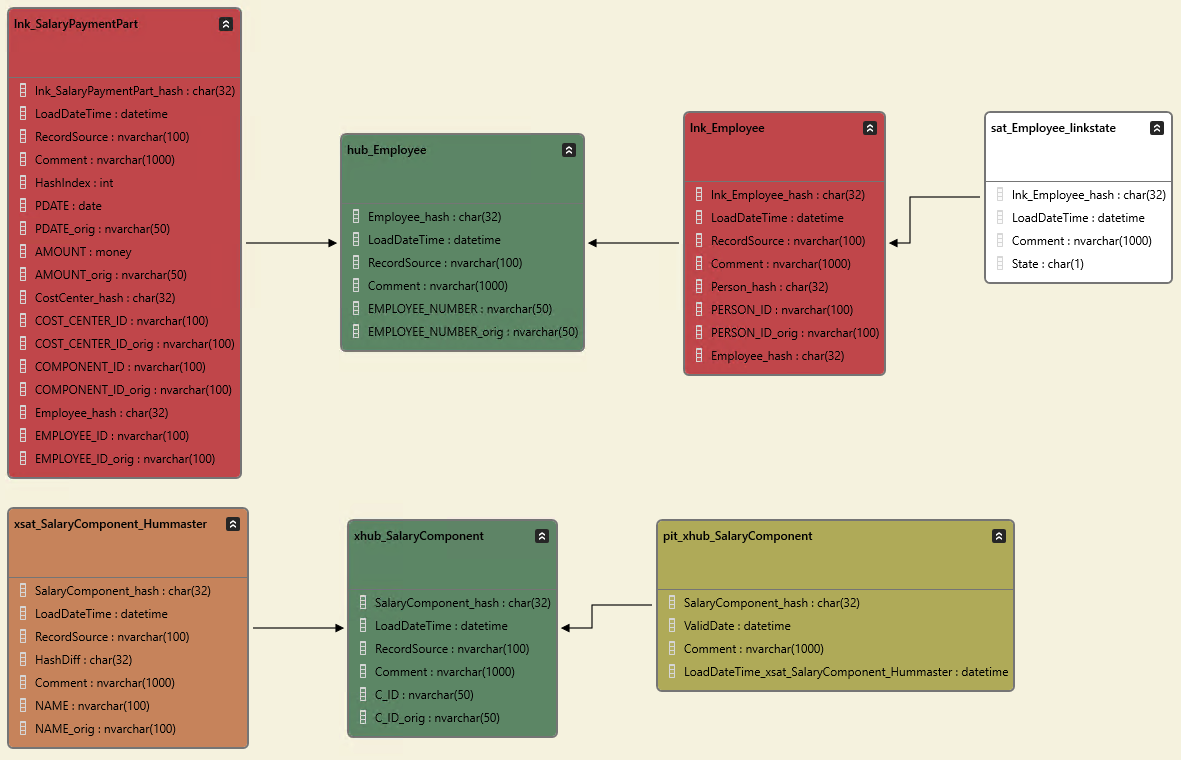
If so, deploy the new classes.
Run Tutorial Scripts
Run the following tutorial script commands fron the Help -> Tutorials -> DSharp Studio Professional Course -> Hash Duplicate Handling menu, and inspect the results.
| Script | Source data | Main points of interest |
|---|---|---|
| Step 1: Load Salary Data | There are real duplicate rows. | Among identical rows, the hashing procedure has generated a running index number to be included in the hash, making the hashes unique. |